
Your contribution button works in test mode. Then you click it twice, a request times out, and the creator's page still shows no payment. Worse, the payment appears in your platform account rather than the creator's account.
A reliable Stripe integration in Node.js needs more than a successful API call. You need the right account context, a durable record of each contribution, and webhook handling that survives retries and restarts. Let's build those pieces around a creator-funding example, without mistaking a local demonstration for a production-ready payment system.
Table of Contents
- How to Install and Initialize the Stripe SDK
- Which Stripe Keys Go Where and Why
- Scope Payments to Creator Connected Accounts
- Create a PaymentIntent Without Double Charges
- Handle Webhooks Without Losing or Double-Counting Payments
- Test Webhooks and Failure Cases Locally
- Go Live After These Checks Pass
How to Install and Initialize the Stripe SDK
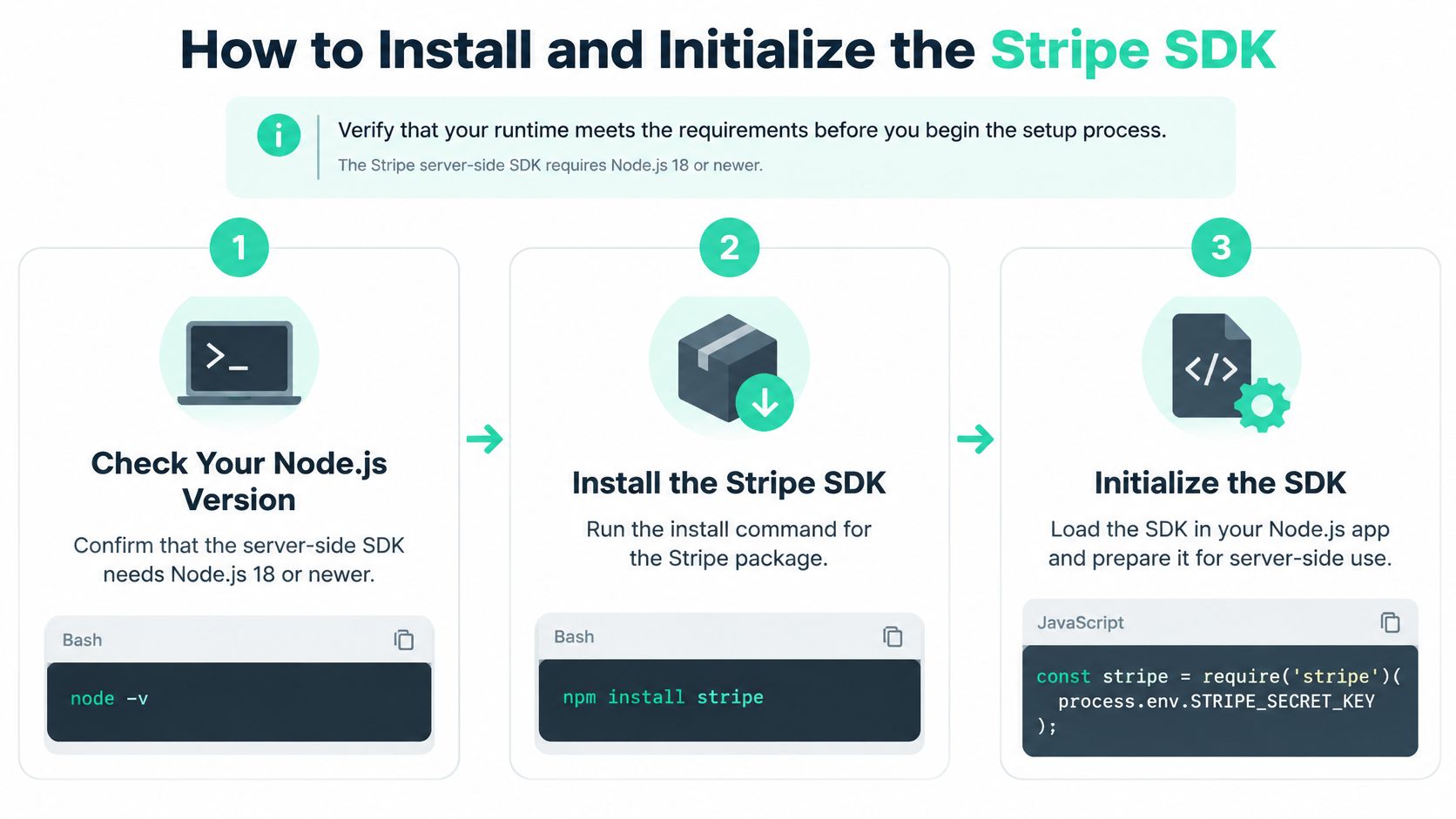
Check your runtime before installing anything. The server-side SDK requires Node.js 18 or newer, according to the Stripe npm package documentation; run node -v in the same environment that will deploy your application.
Prepare the server
Install the packages. In your project folder, run:
npm install stripe --save
npm install express dotenv better-sqlite3
Stripe handles API requests, Express handles HTTP, dotenv loads local configuration, and SQLite gives this example durable storage. Pin your tested Stripe version in
package.jsonand commit the lockfile.Create local secrets. Add this to
.env, replacing the placeholder with your test credential:STRIPE_SECRET_KEY=sk_test_replace_meAdd
.envto.gitignorebefore committing. In production, inject credentials from your hosting platform's secret store instead.Create a shared client. Save this as
lib/stripe.jsafter creating thelibdirectory:require('dotenv').config(); const Stripe = require('stripe'); if (!process.env.STRIPE_SECRET_KEY) { throw new Error('STRIPE_SECRET_KEY is missing'); } const options = {}; if (process.env.STRIPE_API_VERSION) { options.apiVersion = process.env.STRIPE_API_VERSION; } module.exports = new Stripe( process.env.STRIPE_SECRET_KEY, options );Control API behavior. Either configure an API version you've explicitly tested or document the version bundled with your pinned SDK. Configure webhook event versions deliberately too; changing the SDK doesn't automatically change an endpoint's payload format.
Check authentication. Run a small server-side request:
node -e "require('./lib/stripe').balance.retrieve().then(console.log).catch(console.error)"A balance response confirms authentication, not creator onboarding or payment readiness.
Use this setup checklist before adding routes.
Keep payment and customer access separate
Stripe.js is the browser library, not this server SDK. For broader payment context, our Stripe payment gateway guide is a useful companion.
If your application also spans storefronts or customer portals, PlatformDTC's resource on customer access across commerce channels helps frame that separate concern. Authentication determines who can access a contribution; Stripe credentials determine which payment operations your application can perform.
Which Stripe Keys Go Where and Why
The secret API key belongs only on the server. Initialize Stripe.js with a publishable key, and let its payment components collect card information rather than sending raw card details through your Express routes.
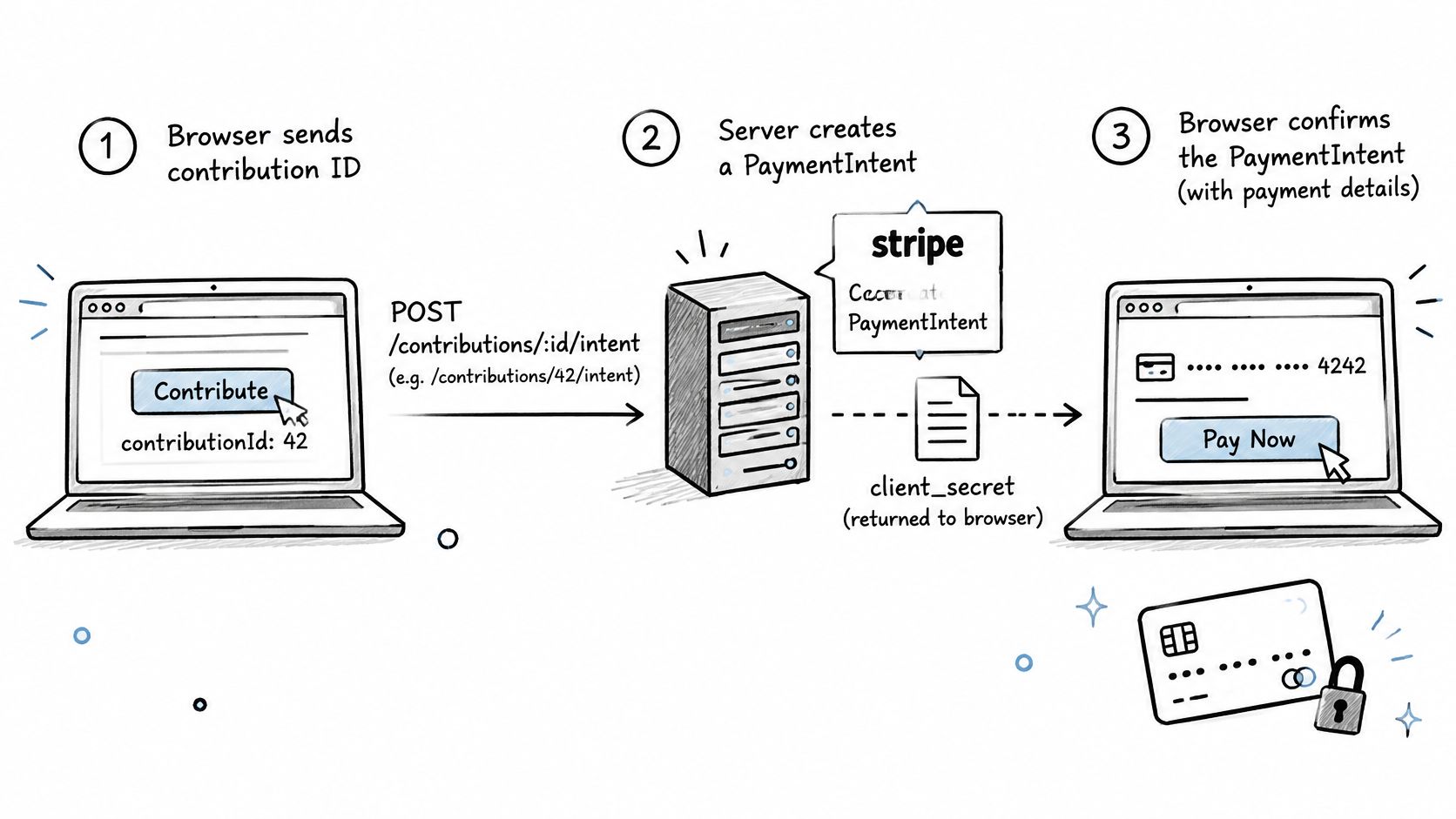
Stripe's payment API design history explains the separation: browser code collects payment information, while server code creates the payment operation. With PaymentIntents, the browser confirms the server-created intent using its client secret.
Stripe credentials, where they live and what they do
| Credential | Prefix | Where it lives | Used for |
|---|---|---|---|
| Secret key | sk_test_... / sk_live_... |
Server environment variables only | Creating PaymentIntents, Checkout Sessions and refunds |
| Publishable key | pk_test_... / pk_live_... |
Browser code, Stripe.js setup | Collecting card details and confirming payments |
| Webhook signing secret | whsec_... |
Server, one value per endpoint | Verifying the Stripe-Signature header on incoming events |
| Connected account ID | acct_... |
Server, sent with each request | Scoping requests to a creator's account in direct charges |
The connected account ID isn't an authentication secret. Your server should still choose it from a trusted creator record; for direct-charge Elements integrations, the browser also needs that account context when initializing Stripe.js.
A PaymentIntent client secret is another deliberate browser-facing value. It grants access to a particular payment flow, not your whole Stripe account. Return it only to the authorized backer, and don't put it in logs, analytics events, or shareable URLs.
Prevent credential leaks
- Frontend bundling: Never place a secret key in a frontend environment variable, even if its name sounds private. Build tools can embed configured values into public JavaScript.
- Git exposure: If you commit
.env, rotate the credential. Removing the file from the latest commit doesn't remove it from repository history. - Mode confusion: Keep local development on test credentials. A leaked live secret can enable unauthorized API operations, including payment creation and refunds.
The CLI listener and each deployed webhook endpoint have their own signing secrets. Using the wrong whsec_ value causes valid deliveries to fail verification.
Deployment check: Search the built frontend, not just your source files.
grep -r 'sk_' dist/
grep -r 'whsec_' dist/
Neither credential should appear. Review matches without copying sensitive values into deployment logs.
Scope Payments to Creator Connected Accounts
Creating a PaymentIntent with the platform client doesn't automatically make it a creator payment. Without account scoping, you create the object on the platform account and attach payment operations to the wrong place.
Stripe's direct-charge documentation states that direct-charge PaymentIntents and Charges exist on the connected account, and requests must carry the Stripe-Account header. The Node.js SDK supplies that header through its request options.
Check readiness before accepting money
Save this helper as lib/creator-account.js:
const stripe = require('./stripe');

module.exports = async function requireReadyCreator(accountId) {
  const account = await stripe.accounts.retrieve(accountId);

  if (
    account.deleted ||
    !account.charges_enabled ||
    account.capabilities?.card_payments !== 'active'
  ) {
    throw new Error('This creator cannot accept card payments yet');
  }

  return account;
};
Onboard the creator through your chosen Connect onboarding flow, then save the resulting account ID against the authenticated creator. Don't accept a replacement account ID from a contribution form.
For a hypothetical contribution, account-scoped creation looks like this:
const stripe = require('./lib/stripe');
const requireReadyCreator = require('./lib/creator-account');

async function createCreatorIntent(creator, amount, currency) {
  await requireReadyCreator(creator.stripeAccountId);

  return stripe.paymentIntents.create(
    { amount, currency, payment_method_types: ['card'] },
    { stripeAccount: creator.stripeAccountId }
  );
}
Use that same request context when retrieving the intent or creating its refund. Dispute and balance investigations must also target the account that owns the charge.
Account ownership isn't the whole operating model
Account readiness can change after a creator publishes a page. Recheck it when accepting contributions, and handle account-related events so you can stop offering payment when the creator becomes ineligible.
- Disabled account: Show a clear unavailable message rather than repeatedly attempting payment creation.
- Refund exposure: Refunds reduce the creator account's balance. Assign responsibility for negative balances before launch.
- Platform fees: If your model uses an application fee, calculate it server-side and include
application_fee_amountdeliberately. Don't assume account scoping collects a platform fee. - Multiple creators: Use the webhook's account field to identify the owning creator, then verify the payment against your stored contribution.
Direct charges reduce platform custody of funds. They don't remove your responsibility to handle failed payments, refunds, and account changes.
For an example of explaining account connection to nontechnical recipients, the VerticalRent vendor payment guide offers useful onboarding context.
Our crowdfunding payment processing guide addresses the creator-funding setting. At Fundl, creators must connect a valid Stripe account; contributions are processed directly through Stripe and transferred to the creator's connected account at payment time. We don't hold or custodise funds.
Create a PaymentIntent Without Double Charges
The browser requests a contribution payment; the server decides what that payment represents. For a hypothetical dollar-denominated contribution, your database might store amount: 2500 and currency: 'usd', representing $25.00 in the smallest currency unit.
The payment flow separates creation from confirmation.
Persist the operation before calling Stripe
Create lib/store.js:
const Database = require('better-sqlite3');
const db = new Database('payments.db');

db.pragma('journal_mode = WAL');
db.exec(`
  CREATE TABLE IF NOT EXISTS contributions (
    id TEXT PRIMARY KEY,
    account_id TEXT NOT NULL,
    amount INTEGER NOT NULL,
    currency TEXT NOT NULL,
    intent_id TEXT UNIQUE,
    status TEXT NOT NULL DEFAULT 'pending'
  );

  CREATE TABLE IF NOT EXISTS webhook_inbox (
    event_id TEXT PRIMARY KEY,
    payload TEXT NOT NULL,
    processed INTEGER NOT NULL DEFAULT 0
  );
`);

module.exports = db;
Create contribution rows through an authenticated server workflow that validates pledge amounts and creator ownership. Freeze the amount, currency, and account once payment creation begins; retries must use the same parameters.
Save this as intent-route.js:
const express = require('express');
const stripe = require('./lib/stripe');
const db = require('./lib/store');
const requireReadyCreator = require('./lib/creator-account');
const router = express.Router();

router.post('/contributions/:id/intent', async (req, res, next) => {
  try {
    const row = db.prepare(
      'SELECT * FROM contributions WHERE id = ?'
    ).get(req.params.id);

    if (!row) return res.sendStatus(404);

    // Production: authorize this backer to access this contribution.
    if (row.status === 'paid') {
      return res.status(409).json({ error: 'Already paid' });
    }

    await requireReadyCreator(row.account_id);

    const options = { stripeAccount: row.account_id };
    const intent = row.intent_id
      ? await stripe.paymentIntents.retrieve(row.intent_id, options)
      : await stripe.paymentIntents.create(
          {
            amount: row.amount,
            currency: row.currency,
            payment_method_types: ['card'],
            metadata: { contributionId: row.id }
          },
          {
            ...options,
            idempotencyKey: `contribution:${row.id}:payment-intent`
          }
        );

    db.prepare(
      'UPDATE contributions SET intent_id = ? WHERE id = ?'
    ).run(intent.id, row.id);

    res.json({ clientSecret: intent.client_secret });
  } catch (error) {
    next(error);
  }
});

module.exports = router;
Mount this router only after authentication and authorization middleware in production. The local demo needs a seeded contribution row before this route can return a payment.
Make ambiguous retries safe
A timeout doesn't tell you whether Stripe created the intent. Reuse the business-operation key, rather than generating a fresh key whenever the HTTP request repeats.
Stripe's API error-handling documentation says API v1 idempotency keys can be reused with their original parameters during the first 24 hours; afterward, Stripe may remove the key and execute a new request. If an unresolved operation reaches that boundary, reconcile it before attempting another creation.
The durable intent_id handles ordinary later requests. A reconciliation job handles the harder case where Stripe created the object but your process crashed before saving its ID. Match account context and contribution metadata, and prevent simultaneous reconciliation and creation.
For an accompanying integration walkthrough, use this video alongside the server flow.
Confirm in the browser
Install @stripe/stripe-js in your frontend project. Given an authorized contribution ID, trusted account ID, payment container, and form, the browser integration is:
import { loadStripe } from '@stripe/stripe-js';

export async function mountPayment({
  publishableKey, accountId, contributionId, container, form, onError
}) {
  const response = await fetch(
    `/contributions/${encodeURIComponent(contributionId)}/intent`,
    { method: 'POST' }
  );
  if (!response.ok) throw new Error('Cannot start payment');

  const { clientSecret } = await response.json();
  const stripe = await loadStripe(publishableKey, {
    stripeAccount: accountId
  });
  if (!stripe) throw new Error('Stripe.js failed to load');

  const elements = stripe.elements({ clientSecret });
  elements.create('payment').mount(container);

  form.addEventListener('submit', async event => {
    event.preventDefault();
    const result = await stripe.confirmPayment({
      elements,
      confirmParams: { return_url: window.location.href },
      redirect: 'if_required'
    });
    if (result.error) onError(result.error.message);
  });
}
Checkout Sessions suit teams that want Stripe-hosted payment collection. PaymentIntents with Elements suit a custom checkout interface; this example illustrates that option, not Fundl's actual checkout implementation.
Handle Webhooks Without Losing or Double-Counting Payments
A customer can close their tab before your success page loads. A redirect also doesn't authenticate the payment state. Verified webhook events, matched to your stored payment, determine whether you mark a contribution paid.
Stripe's webhook documentation requires the unmodified payload for signature verification, specifies HTTP 400 for invalid signatures, and describes live-mode delivery retries for up to three days with exponential backoff.
Accept durably before acknowledging
Save this as server.js:
const express = require('express');
const stripe = require('./lib/stripe');
const db = require('./lib/store');

const app = express();

app.post('/webhooks', express.raw({ type: 'application/json' }),
  (req, res) => {
    let event;
    try {
      event = stripe.webhooks.constructEvent(
        req.body,
        req.headers['stripe-signature'],
        process.env.STRIPE_WEBHOOK_SECRET
      );
    } catch {
      return res.status(400).send('Invalid signature');
    }

    try {
      db.prepare(`
        INSERT INTO webhook_inbox (event_id, payload)
        VALUES (?, ?)
        ON CONFLICT(event_id) DO NOTHING
      `).run(event.id, JSON.stringify(event));

      return res.sendStatus(200);
    } catch (error) {
      console.error('Webhook persistence failed', error.message);
      return res.sendStatus(503);
    }
  }
);

app.use(express.json());
app.use(require('./intent-route'));

app.use((error, req, res, next) => {
  console.error(error.message);
  res.status(500).json({ error: 'Payment operation unavailable' });
});

app.listen(3000);
The primary key rejects duplicate event IDs without a race-prone read-then-insert check. Returning success means the event is stored, not necessarily fulfilled.
Don't acknowledge before persisting the event or publishing it to a durable queue. An in-memory callback can disappear when the process exits, leaving Stripe with a successful delivery and your database with unfinished work.
Process each business transition once
This minimal worker handles successful PaymentIntents. Save it as worker.js and run it repeatedly through your scheduler or worker supervisor:
const db = require('./lib/store');

const apply = db.transaction(row => {
  const event = JSON.parse(row.payload);

  if (event.type !== 'payment_intent.succeeded') return;

  const intent = event.data.object;
  const contribution = db.prepare(`
    SELECT * FROM contributions WHERE intent_id = ? AND account_id = ?
  `).get(intent.id, event.account);

  if (
    !contribution ||
    contribution.amount !== intent.amount ||
    contribution.currency !== intent.currency
  ) {
    throw new Error('Payment does not match contribution');
  }

  db.prepare(`
    UPDATE contributions SET status = 'paid'
    WHERE id = ? AND status != 'paid'
  `).run(contribution.id);

  db.prepare(
    'UPDATE webhook_inbox SET processed = 1 WHERE event_id = ?'
  ).run(event.id);
});

for (const row of db.prepare(
  'SELECT * FROM webhook_inbox WHERE processed = 0'
).all()) {
  try {
    apply(row);
  } catch (error) {
    console.error(row.event_id, error.message);
  }
}
This worker intentionally leaves other event types pending for their handlers. Add alerting for unmatched payments, and implement the remaining transitions before launch.
Webhook events and what your handler does
| Event | Meaning | What your handler does |
|---|---|---|
payment_intent.succeeded |
Funds were captured | Mark the contribution paid and refresh the traction page once |
payment_intent.payment_failed |
Payment attempt failed | Record the failed attempt and let the backer retry |
charge.refunded |
A refund was issued | Reverse the refunded contribution amount and update totals |
charge.dispute.created |
The backer disputed the charge | Flag the project and collect evidence within the stated deadline |
Don't let a delayed failure overwrite a paid contribution. For partial refunds, reverse only the refunded amount.
Fulfillment rule: Deduplicate the business action as well as the event ID. Distinct events can describe the same payment outcome.
Write email and metric-refresh jobs to a transactional outbox alongside the payment update. Gateway reporting remains a separate reconciliation task; Loopfour's guide to matching gateway settlements to bank deposits provides useful operational context.
Test Webhooks and Failure Cases Locally
Test outcomes, not just successful HTTP requests. Our Stripe payment verification guide provides additional context for checking the payment record independently of the browser.
Exercise the failure paths
Connect the CLI. Install Stripe CLI and run
stripe login. Confirm it's connected to the intended test environment.Forward deliveries. Run:
stripe listen --forward-to localhost:3000/webhooks \
  --forward-connect-to localhost:3000/webhooks
Put the printed signing secret into local
STRIPE_WEBHOOK_SECRET, then restart the server. Connected-account events need the Connect forwarding path.Check a successful event. Run
stripe trigger payment_intent.succeededto verify delivery and inbox persistence. Its generic fixture won't match your contribution record; complete a payment created by your own route to test the transition to paid.Repeat a delivery. Resend the same event to a registered test endpoint from the Dashboard, or replay a saved verified event through a controlled test harness. Expect successful acknowledgement with no additional fulfillment.
Break the signature. POST a JSON payload with a bogus
Stripe-Signatureheader. Expect rejection and no inbox entry.Interrupt processing. Stop the worker during processing and restart it. Expect an unfinished inbox item to remain available; if the database transaction committed, rerunning must not duplicate the business update.
Repeat creation. Call the intent route again for the same contribution. Check that the stored PaymentIntent ID remains unchanged, including after a simulated timeout.
Inspect account ownership. Create and confirm a payment for a connected test account. Find it in that account's Dashboard context and verify that the webhook
accountmatches your contribution's account ID.
Record release evidence
| Check | Passing evidence |
|---|---|
| Successful contribution | Stored intent matches a paid contribution |
| Duplicate delivery | No additional contribution or fulfillment |
| Invalid signature | No persisted event |
| Worker restart | Pending work completes safely |
| Creation retry | Same PaymentIntent |
| Connected account | Dashboard ownership and event account agree |
Also test declines, authentication challenges, delayed events, and unavailable creator accounts. A backer should get a recoverable message rather than an unexplained server error.
Go Live After These Checks Pass
Passing local tests doesn't validate production credentials, live creator eligibility, or the deployed endpoint. Treat the live switch as a controlled release, not a search-and-replace operation.
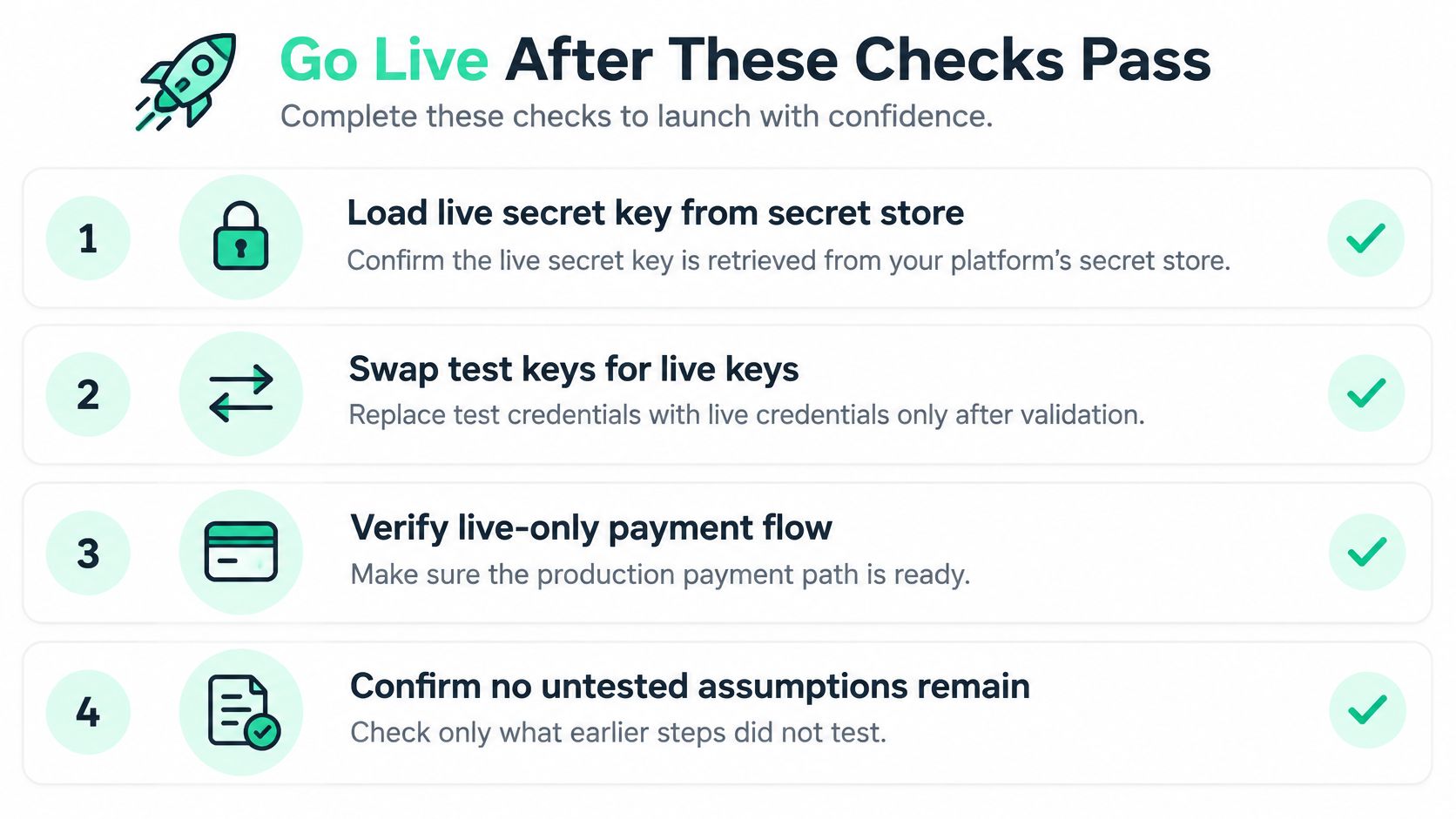
Use this checklist to separate deployment readiness from test-mode success.
Make the production decision
- Load live credentials securely. Inject the live secret from your secret store and deploy the matching publishable key. Keep production credentials unavailable to local development processes.
- Use live account records. Verify that each eligible creator has a valid live connected account. Don't reuse test account identifiers or assume test onboarding proves live readiness.
- Register the production webhook. Configure a live endpoint for connected-account events and install its own signing secret. Confirm the selected event types and payload version match your handlers.
- Run a controlled real contribution. Temporarily activate the production path for a creator account you control. Confirm ownership, verified payment state, and fulfillment before opening contributions broadly.
- Watch production failures. Monitor failed deliveries, pending inbox items, worker errors, and account-readiness failures. Assign someone to investigate them rather than relying on backer reports.
Keep the funding terms visible
For a creator-funding page, Fundl connects to your Stripe account and displays verified traction data alongside the funding flow. Stripe's standard processing fees apply in addition to our platform fee and are separate from our charges, so account for both when setting pledge amounts.
Using our platform also means agreeing to Stripe's Services Agreement. We aren't responsible for payment-processing errors, failures, or delays caused by Stripe, and we reserve the right to suspend a project if its creator's Stripe account becomes invalid or Stripe terminates it.
Go only when the controlled live payment, endpoint delivery, and production worker checks pass. If any check fails, keep public contributions disabled and fix the failure before completing the live-key switch.
Fundl gives creators a shareable funding page backed by verified revenue, build activity, and audience signals, with contributions processed through their connected Stripe accounts. Visit Fundl to connect your project's data and let backers evaluate live traction before contributing.