
You're about to launch a small product. The landing page is ready, your first users are waiting, and then a deceptively simple question appears: how will someone pay you? A button seems like the obvious answer, until a customer's bank asks for extra authentication, a payment method takes time to settle, or a network timeout leaves your server unsure whether it created a charge.
That's why the Stripe payments gateway is better understood as programmable payments infrastructure than as a checkout button. Your application creates payment objects, responds to customer actions, receives asynchronous events, and maintains its own record of what happened. Once you adopt that mental model, the implementation choices become much easier to reason about.
Table of Contents
- A First Weekend With Online Payments
- How a Payment Actually Flows Through Stripe
- The Core APIs Every Founder Actually Uses
- Pricing and the Real Cost of Payment Methods
- From Zero to First Charge in One Evening
- What Direct Payments Actually Mean for Risk
- Quick Checklist Before You Go Live and What Comes Next
A First Weekend With Online Payments
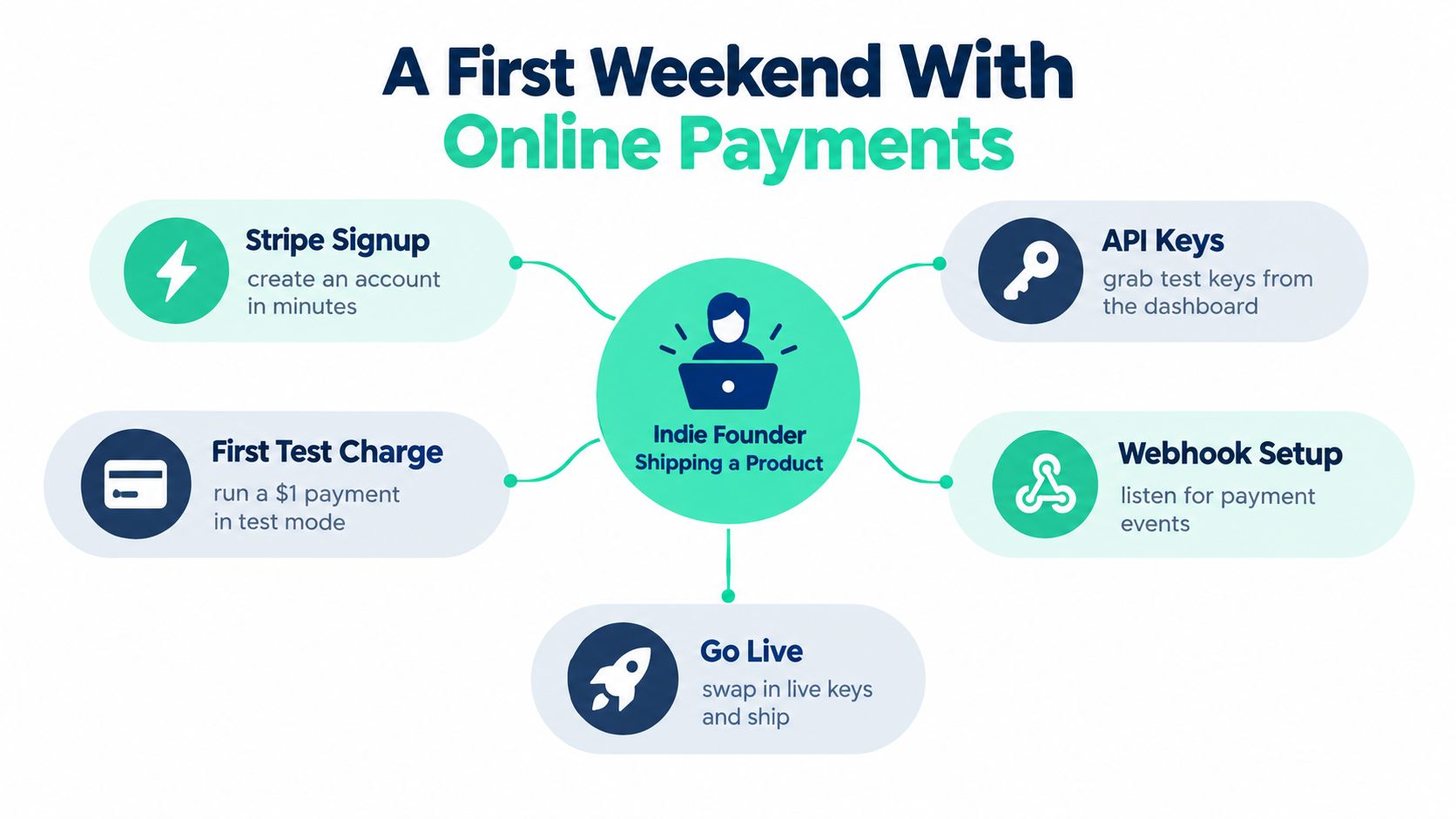
On Friday evening, an indie founder opens a Stripe account and adds a checkout button to a product page. By Saturday morning, a test card works, the browser shows a success message, and the integration appears finished. On Sunday, a real customer is redirected to a bank page for additional verification. The browser returns to the site, but the backend hasn't received confirmation yet.
That gap is where many first integrations go wrong. A payment isn't a single click followed by an immediate truth. It can involve card authorization, 3-D Secure authentication, bank redirects, asynchronous processing, and a later server notification. Your product needs to represent those states instead of guessing from what the browser displays.
Why Stripe began with developers
Stripe's architecture makes more sense when you know its origin. Stripe was founded by brothers Patrick and John Collison, who built the first prototype in January 2010, entered Y Combinator that same year, and publicly launched on September 30, 2011. Its 2011 funding round included Elon Musk, Peter Thiel, Sequoia Capital, Andreessen Horowitz, and SV Angel, as documented in Stripe's company history.
The important part isn't only the launch date. The Collison brothers focused on making payment acceptance available through programmable APIs that developers could integrate into websites and mobile applications. Stripe later introduced Stripe Connect, a multiparty payments product that lets platforms embed payments for separate businesses or users.
For a founder, that history leads to a practical conclusion:
Treat Stripe as a payment system your application orchestrates, not a widget your application merely displays.
Your first successful test charge is only the beginning. The next question is how Stripe represents the journey from payment request to confirmed settlement.
How a Payment Actually Flows Through Stripe
A useful analogy is package delivery. You create a shipping label, the customer hands over the package, several facilities process it, and the final delivery event arrives later. A tracking page can show “in transit” without proving that the recipient has received the package. Payments work similarly.
The PaymentIntent is the tracking record
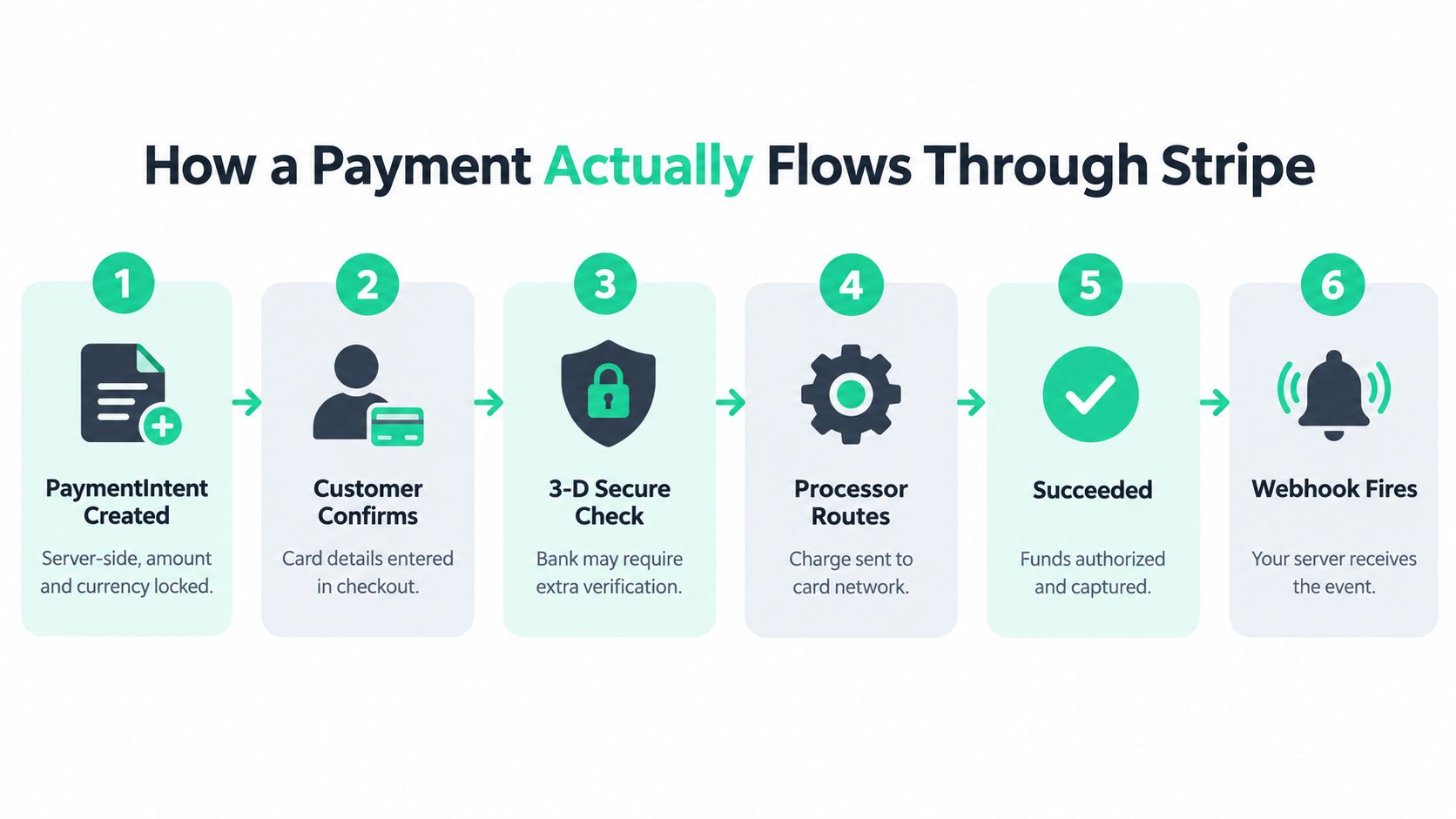
Stripe's PaymentIntents API should be treated as a server-side state machine. Your server creates a PaymentIntent with an amount and currency, then sends the relevant client secret to the checkout interface. The customer confirms the payment method, and Stripe determines whether additional steps are required.
A typical lifecycle looks like this:
- Create the PaymentIntent. Your backend creates the payment object and associates its ID with your local order or contribution.
- Confirm the payment method. The customer enters card details or selects another enabled method.
- Handle customer action. The bank may require 3-D Secure authentication, a redirect, or another approval step. The PaymentIntent can enter
requires_action. - Wait during processing. Some payment methods settle asynchronously. The PaymentIntent can enter
processing, which means your application shouldn't grant the product yet. - Receive the terminal outcome. The payment can succeed or fail.
- Process the webhook. Stripe sends an event to your backend, including
payment_intent.succeededwhen the payment has succeeded.
The browser's return URL isn't a settlement receipt. A customer can close the tab, lose connectivity, or return before an asynchronous payment finishes. Fulfillment should happen only after your backend receives and verifies the relevant webhook. Stripe explains this approach in its PaymentIntent status verification documentation.
Keep the PaymentIntent ID in your database beside the local transaction ID. That gives your support team and reconciliation jobs a stable reference instead of forcing them to infer payment status from a redirect.
For a broader comparison of payment tools and their operational differences, see this reviewed payment-processing overview on SubmitMySaas. The useful lesson is consistent: payment selection matters less than whether your application handles the complete lifecycle correctly.
The Core APIs Every Founder Actually Uses
You don't need to learn every Stripe product before shipping. Most first integrations depend on four surfaces, each answering a different engineering question.
PaymentIntents decide what you're trying to collect
A PaymentIntent represents the payment attempt, including its amount, currency, customer actions, processing state, and final outcome. Your server creates it. Your client helps the customer confirm it. Your webhook handler updates your application when Stripe reports what happened.
This separation matters because secret-key operations belong on the server, while the browser needs only the limited information required to complete confirmation.
Webhooks tell your backend what happened
A webhook is an event delivery mechanism from Stripe to your server. Your endpoint should verify the Stripe-Signature, parse the event, and update your local record. It should also tolerate retries, because event delivery can happen more than once.
Don't put fulfillment logic only in a success-page handler. A success page is useful for showing the customer an immediate status, but the webhook is the reliable input for granting access, publishing a contribution, or updating creator totals. For implementation patterns involving secure payment data and event handling, review these tokenization and webhook best practices.
Idempotency keys make retries safe
Suppose your server sends a request to create a PaymentIntent and then times out. You don't know whether Stripe received the request. Retrying without protection could create a second PaymentIntent and a duplicate local order.
An idempotency key tells Stripe that repeated requests belong to the same intended operation. Generate it from a stable Fundl-side transaction identifier, such as a unique contribution or order ID, rather than from a timestamp or browser session. Stripe supports idempotency keys on POST requests, allows keys up to 255 characters, and documents their use in its PaymentIntents API reference.
Your webhook fulfillment should be idempotent too. Store processed event IDs, check whether the contribution is already fulfilled, and make repeated delivery harmless.
Connect handles money moving between accounts
Stripe Connect is the relevant surface when a platform supports multiple creators, sellers, or service providers. It supports account connections and payment flows where the relevant business or creator can receive funds through its own Stripe account.
That creates a different operating model from a platform-held merchant account. The platform can coordinate the experience and maintain a local ledger, while the connected account carries account, compliance, payout, and payment-risk responsibilities. A founder deciding whether to use Connect should first answer who owns the customer relationship, who fulfills the order, and whose balance should absorb refunds or disputes.
| API surface | Founder decision |
|---|---|
| PaymentIntents | How will the application represent an incomplete or successful payment? |
| Webhooks | Which server event authorizes fulfillment? |
| Idempotency keys | How will a timeout avoid duplicate payments? |
| Stripe Connect | Which account receives the money and carries operational responsibility? |
Pricing and the Real Cost of Payment Methods
Stripe pricing isn't only a line item attached to a successful card charge. Your actual cost depends on the payment method, currency, market, refunds, disputes, reconciliation effort, and the revenue you lose when a customer can't use a familiar checkout option. Exact fees can change by region and product, so check the current Stripe pricing page for the account and methods you plan to enable.
The strategic mistake is enabling every method just because the dashboard offers it. A small SaaS product with one primary market may need cards and a wallet first. A global creator campaign may need a different mix, especially when customers expect local bank methods or regional wallets.
Conversion is part of payment economics
Stripe's 2025 experiment found that dynamically showing at least one relevant non-card payment method produced an average 7.4% conversion increase and 12% revenue increase among eligible checkouts, according to Stripe's payment-method experiment. The reported results varied by method: Apple Pay was associated with a 22.3% conversion increase, WeChat Pay with 13%, and Revolut Pay with 3% among eligible checkouts.
Those figures aren't a universal promise. They show why relevance matters. A method can perform well for one audience and add little value for another because eligibility, geography, device, currency, refund behavior, and support requirements differ.
Track more than Stripe's successful-payment count:
- Authorization rate: how often an attempted payment is approved.
- Completed checkout rate: how often a started checkout reaches completion.
- Net revenue: what remains after payment costs, refunds, and reversals.
- Refund rate: how often customers request money back.
- Support burden: how much operational work each method creates.
| Payment method | Typical use case | Reported conversion impact | Key trade-off |
|---|---|---|---|
| Cards | Broad online acceptance | Baseline varies by audience | Familiar, but subject to declines and fraud checks |
| Apple Pay | Eligible mobile and Apple-device checkouts | 22.3% associated increase in Stripe's experiment | Depends on device and customer eligibility |
| WeChat Pay | Customers using WeChat-based payments | 13% associated increase in Stripe's experiment | Strongly market-dependent |
| Revolut Pay | Eligible Revolut customers | 3% associated increase in Stripe's experiment | Smaller eligible audience in some markets |
| Other relevant non-card methods | Localized international checkouts | 7.4% average increase when at least one relevant method was shown | Requires segmentation and reconciliation |
For a crowdfunding-specific view of payment flows and trade-offs, see crowdfunding payment processing. Build the smallest method set that matches your customers, then compare performance by market instead of treating payment coverage as a checklist.
From Zero to First Charge in One Evening
A solo founder can make meaningful progress in one evening if the first goal is narrow: create one payment, confirm it, receive the webhook, and record the result correctly. Don't begin with subscriptions, refunds, a dozen payment methods, and a custom reporting system. Prove the payment state transition first.
Start with the server boundary
Create the Stripe account that should receive the funds, then install the server-side Stripe SDK for your language. Keep the secret key on the server. Your first backend endpoint should accept a local transaction ID, load the amount from your database, and create a PaymentIntent. Don't trust an amount supplied by the browser.
The endpoint should save the PaymentIntent ID with the local contribution or order before returning the client secret. If the request can be retried, use the local transaction ID as the basis for an idempotency key. That lets a timeout repeat the same operation rather than create an unrelated payment.
Let the client confirm, but don't let it settle the order
The browser uses the publishable key and client secret to confirm the PaymentIntent. It may display a loading state, request authentication, redirect the customer, or show an error. Those are customer-experience states, not your final accounting decision.
Register a webhook endpoint and store its signing secret securely. The handler should verify the signature, locate the local record through the PaymentIntent ID, and process payment_intent.succeeded. If the event indicates requires_action or processing, keep the contribution pending rather than granting access.
A practical evening sequence looks like this:
- Create the local record. Assign a unique contribution or order ID.
- Create the PaymentIntent. Use the server-calculated amount and a stable idempotency key.
- Persist the Stripe ID. Store it before the customer completes checkout.
- Confirm in the client. Handle authentication and failure states visibly.
- Receive the webhook. Verify the signature and deduplicate the event ID.
- Fulfill once. Mark the record paid only after verified success.
The smallest convincing test is a test-mode payment that travels through the complete path, followed by a production payment where the money appears in the creator's own Stripe account. Fundl's Stripe payment integration guide is relevant when a contribution flow needs to connect creator-owned Stripe accounts rather than route funds through a platform-held balance.
What Direct Payments Actually Mean for Risk
Connecting a creator's own Stripe account doesn't remove payment risk. It changes who carries it.
With a direct-account flow, a dispute can reduce the creator's available balance. Stripe states that it can debit the disputed amount and a dispute fee from the connected account, and that funds may remain unavailable during the dispute process. Stripe says disputes can take 2 to 3 months to resolve, while dispute fees are generally non-refundable outside specific exceptions, as described in its dispute guidance.
Refunds and disputes are different events
A refund is initiated by the business to return a payment. A dispute is raised through the customer's bank or card issuer, often because the customer challenges the transaction. The response process, evidence requirements, timing, and balance impact differ.
For a reward-based campaign or preorder, the delay between collecting money and delivering the product creates exposure. A campaign can look successful in gross contributions while its available balance is reduced by refunds, chargebacks, or payment reversals.
Liquidity rule: Don't treat gross payment volume as cash you can safely spend before fulfillment.
Build the operating habit before launch
A creator using direct payments should maintain a reserve for reversals and disputes. The reserve doesn't need to be calculated from an invented universal percentage. It should reflect the product's delivery delay, refund terms, customer support quality, and ability to replace disputed funds.
Keep evidence in a form your team can retrieve:
- Fulfillment records: retain delivery, access, or shipment evidence.
- Customer communications: preserve relevant order and support messages.
- Clear descriptions: ensure the statement descriptor and checkout copy identify the product.
- Balance monitoring: watch available balance separately from gross volume.
- Ownership clarity: decide whether Fundl, the creator, or a support contractor handles customer questions and evidence preparation.
This is the trade-off behind avoiding platform-held escrow. The platform can make a creator-owned flow simpler for ownership and payout control, but the creator remains responsible for compliance, fulfillment, liquidity, refunds, and disputes. For the verification side of a contribution workflow, review payment verification for Stripe, then document the response process before inviting backers.
Quick Checklist Before You Go Live and What Comes Next
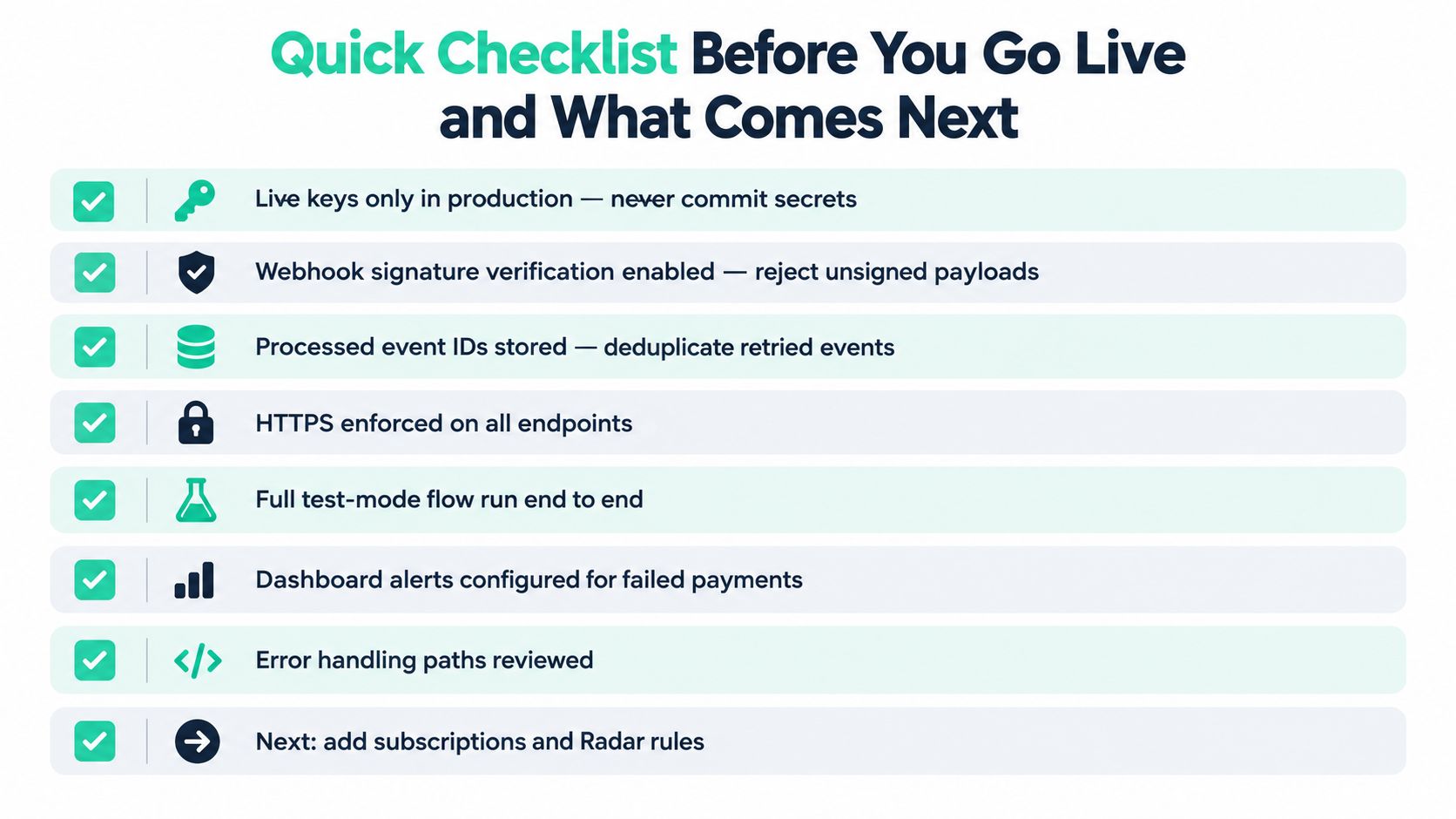
A production payment integration is ready when it can handle uncertainty, not just when a test card succeeds. Run through the checklist below with the same seriousness you'd apply to authentication or data loss prevention.
The launch gate
- Use live keys only in production: Keep secret credentials out of source control and separate test configuration from live configuration.
- Verify webhook signatures: Reject unsigned or invalid payloads before your application acts on them.
- Store processed event IDs: Make replayed webhook delivery harmless.
- Enforce HTTPS: Protect payment-related communication between the browser and your server.
- Run the full test flow: Cover confirmation, authentication, failure, processing, webhook delivery, and fulfillment.
- Configure payment alerts: Watch failed payments, unusual reversals, and balance changes.
- Review error paths: Confirm that customers see a useful status when the browser closes or a request times out.
- Document disputes: Decide who gathers fulfillment evidence and monitors the creator's available balance.
Production rule: Your database should be able to explain every contribution without asking the customer what their browser displayed.
Choose the next Stripe surface deliberately
After the first successful payment, choose the next feature based on your product shape. A SaaS product may need Stripe Billing for subscriptions. A marketplace or creator platform may need Stripe Connect and clearer account onboarding. A product with higher fraud exposure may need Radar rules and review workflows. Tax and reporting become important as transactions, regions, and team responsibilities expand.
Fundl's model fits a specific direct-account use case. Creators connect their own Stripe account, contributions go directly through that account, and a shareable traction page can display live Stripe revenue data alongside other verified signals. That approach doesn't replace the payment architecture described here. It makes correct webhooks, reconciliation, and dispute handling more important because the creator owns the payment relationship.
If you're raising support for a SaaS product, developer tool, course, or AI product, connect your Stripe account to Fundl, publish a live traction page, and let backers evaluate current evidence instead of relying on static promises. Set up your goal, connect your data, and start accepting creator-owned contributions with the payment state and operational responsibility clearly in view.