
Most guides tell you to type Closes #1234 in the commit and treat the issue as finished. That advice mashes three facts into one line. A GitHub commit link to an issue only shows that a change mentions the issue. It does not show that anyone reviewed the diff, that the branch merged, or that the change reached users.
I would publish those layers separately. A reference on the commit is implementation history. A closing keyword is a request to change issue state later. A pull request link is the review trail. If you score them as one blob, unfinished work looks shipped.
Table of Contents
- Commit Keywords That Link or Close Issues
- How to Link a Commit to a GitHub Issue
- Cross-Repository References and Commit SHAs
- Why Links Stay Open or Hidden and How to Prevent It
- Auditing Linked Commits Across Repositories and Merges
Commit Keywords That Link or Close Issues
A commit reference records implementation activity. A closing keyword can change an issue's state after a pull request merges. Keep those functions separate: the link helps readers follow the code, while the keyword requests closure.
| Intent | Keywords | Example | What GitHub does |
|---|---|---|---|
| Link only, issue stays open | #1234, addresses, references, see, related to | Addresses #1234 | Adds the commit to the issue timeline |
| Close after default-branch merge | close, closes, closed | Closes #10 | Closes the issue when the pull request merges to the default branch |
| Close after default-branch merge | fix, fixes, fixed | Fixes #10 | Same close behavior as close |
| Close after default-branch merge | resolve, resolves, resolved | Resolves #10 | Same close behavior as close |
| Close an issue in another repo | same closing keywords plus owner/repo | Fixes octo-org/octo-repo#100 | Targets that repository's issue |
| Several issues in one message | repeat the keyword, comma-separated | Resolves #10, resolves #123, resolves octo-org/octo-repo#100 | Each listed issue is processed |
GitHub's issue-linking documentation explains how commit references connect to issues. A commit message can include an issue number, such as #1234, and GitHub adds a link to that commit in the issue conversation timeline. A phrase such as “Addresses #1234” makes the reference explicit without asking GitHub to close the issue.
Link versus close
An ordinary reference creates traceability. It does not, by itself, close the issue. GitHub's issue-linking documentation describes automatic closure through a pull request that uses a closing keyword, such as Closes #1234. The issue closes when that pull request merges into the default branch.
Treat the commit link as evidence that code was associated with the issue, not as proof that the work was reviewed, merged, or deployed. The pull request and its merge provide separate evidence. Auto-close is a weak audit trail on its own: it records a state change, but does not establish what was reviewed or whether the change reached users.
Closing words are close, closes, closed, fix, fixes, fixed, resolve, resolves, and resolved. Matching ignores case. The format is KEYWORD #ISSUE-NUMBER. A closing keyword in a feature-branch commit alone does not close the issue. If that keyword does not reach the default branch through a pull request, the issue stays open.
One message can name several issues. Repeat the closing keyword for each issue, rather than assuming one verb applies to every number. For example, Resolves #10, resolves #123 makes the intent clear for both.
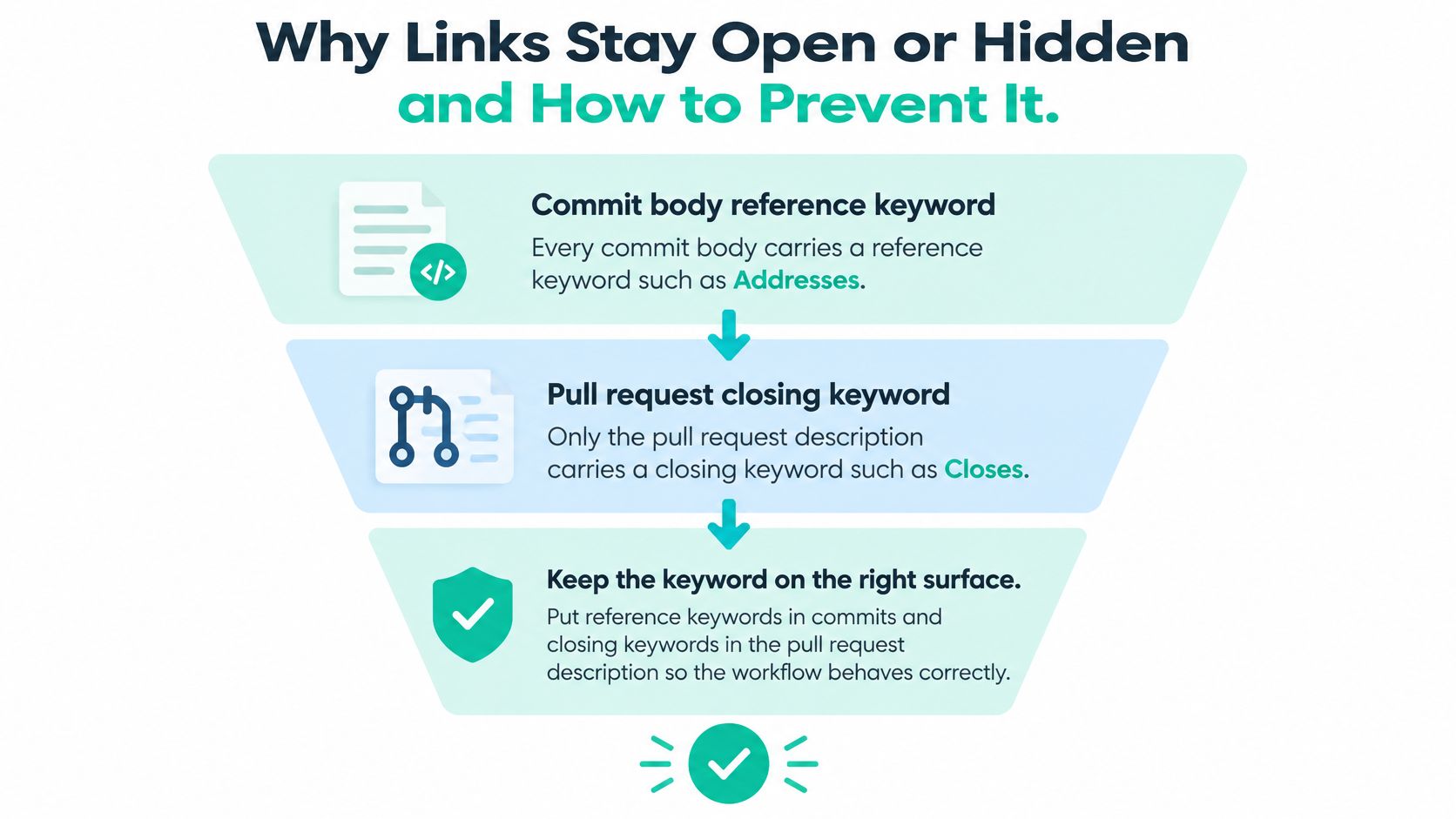
Practical rule: Use a non-closing phrase in branch commits. Put a closing keyword in the pull request when that pull request is meant to close the issue.
For issue 1234, keep the commit message focused on the change and use a reference that leaves the issue open:
fix(auth): reject expired tokens
Addresses #1234
Keep Closes #1234 off this commit. Add it to the pull request that will merge the fix, so the commit timeline shows implementation activity without presenting the issue as complete.
How to Link a Commit to a GitHub Issue
Say issue 1234 is “expired session tokens,” and the issue lives in the repository you are about to change. The sequence below is the one I would follow when the timeline has been a mess of half-pushed SHAs.
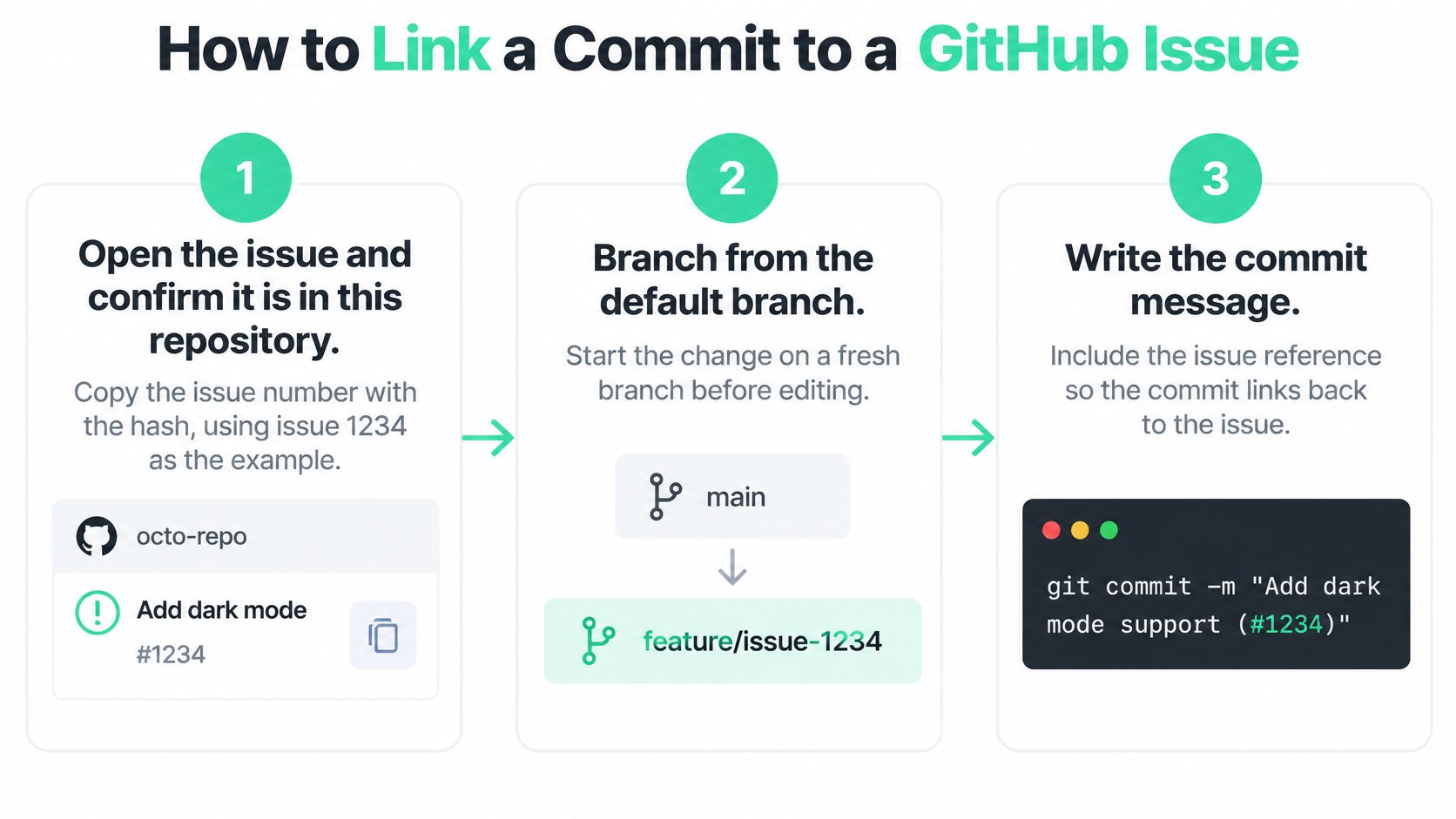
Open the issue and copy the number with the hash. Confirm the issue is in this repository, not a sibling repo with the same digits. The slip that breaks this step is omitting the
#. A bare1234is plain text, and GitHub will not attach the commit to the timeline.Branch from the default branch. Name it something you can recognize later, such as
fix/expired-token, so the pull request has a clean merge target. Starting from a stale personal branch is the mistake here. Your later merge then carries unrelated commits, and the issue timeline no longer matches the bug you meant to fix.Stage only the files that belong to 1234. Leave drive-by refactors for another commit. Mixing them in makes the linked diff look larger than the fix, and a reviewer cannot tell which hunk expired the token check.
Write a subject of about 50 characters, a blank line, then the reference. A subject such as
fix(auth): reject expired tokensstates the change. The body containsAddresses #1234. Do not putClosesin this feature-branch commit. Also skip aFixes:footer that some commit templates or mail gateways strip. If the keyword is not in the message GitHub stores, the link never appears.Push the branch and open the pull request. If merge should close the issue, put
Closes #1234in the pull request description. That description is the reliable place for a closing keyword. Amending or rebasing after reviewers already opened the old SHA is the slip that breaks this step. Their comments sit on a commit that no longer exists, and the new SHA needs its own reference. A clean commit and push keeps that SHA stable until review finishes.After the merge into the default branch, reopen issue 1234. Check that the commit is on the timeline. The state should be closed only if the merged pull request used a closing keyword. If the issue is still open, the keyword was missing or it lived only on the branch commit.
A linked commit means the patch mentions the bug. It does not mean the patch survived review.
If you are connecting a product repository before any of this linking starts, the GitHub setup in AppJet is a concrete walkthrough of attaching the repo so later commits and issues share one project. Do that once, then keep issue numbers in commit bodies rather than in chat.
Cross-Repository References and Commit SHAs
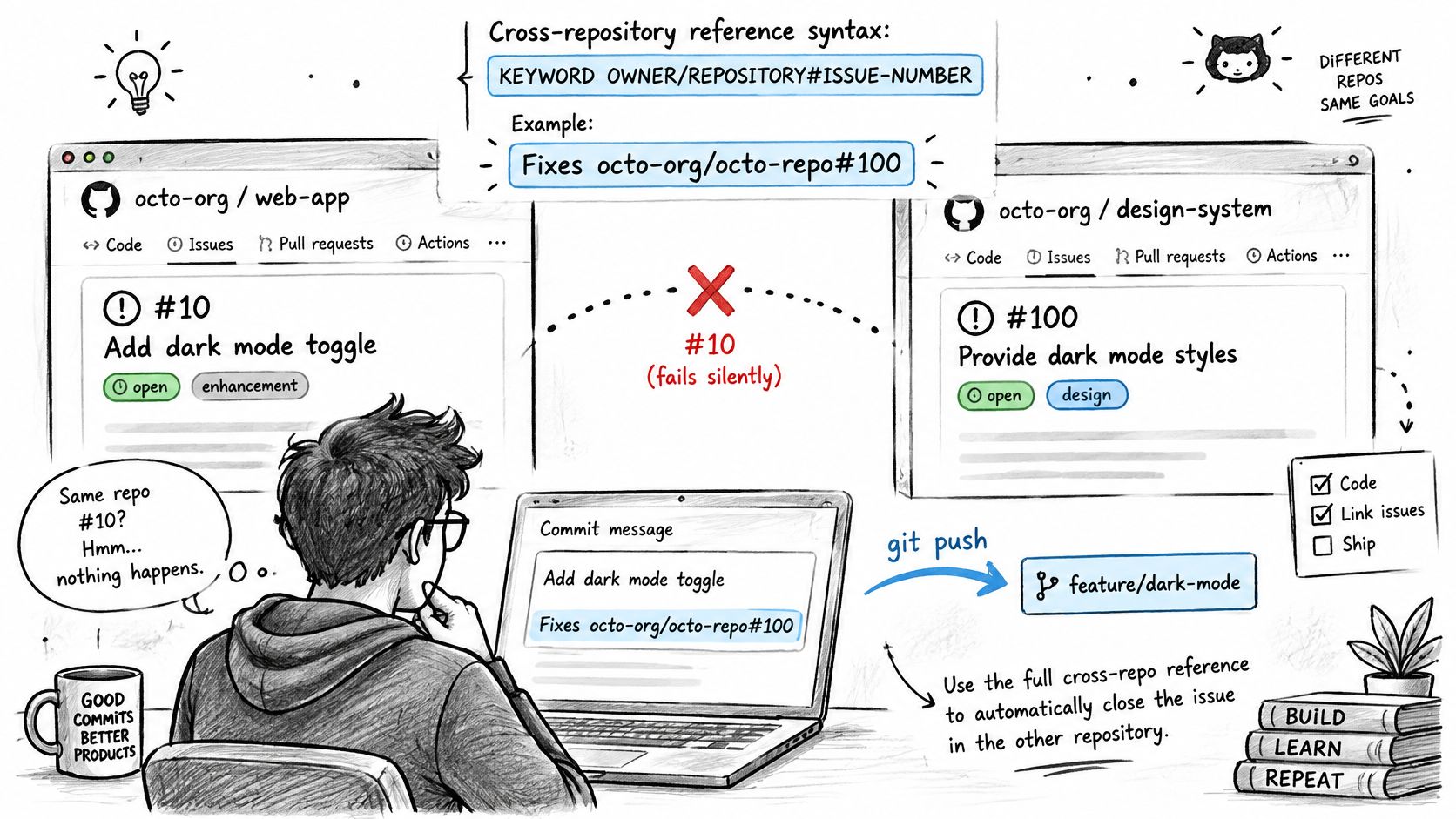
A commit link is implementation evidence, not proof that the change passed review or shipped. When an issue lives in another repository, a same-repository reference such as #10 will not connect its timeline. Use the issue's owner and repository explicitly, then check the commit, pull request, and merge as separate evidence.
The cross-repository form
GitHub's autolinked references document both formats. For an issue in the same repository, use KEYWORD #ISSUE-NUMBER, such as Closes #10. For another repository, include its owner and name: KEYWORD OWNER/REPOSITORY#ISSUE-NUMBER, such as Addresses octo-org/octo-repo#100.
A message can reference issues in both repositories, for example: Addresses #10, Addresses #123, Addresses octo-org/octo-repo#100. GitHub also makes a full commit URL or 40-character SHA clickable, displaying a shortened form such as a5c3785. That link takes a reviewer to the exact commit and its patch. It does not establish that the change was reviewed, merged, or released.
For cross-repository work, preserve the identifiers needed to trace each layer:
- Issue owner: the account or organization before the slash.
- Repository name: the repository that owns the issue.
- Issue number: the number shown in that repository's issue.
- Full SHA: all 40 characters, rather than the shortened form shown in the interface.
Short SHAs are convenient for clicking, but poor join keys when different repositories share the same prefix.
Four ways the link goes nowhere
A mistyped owner prevents the reference from matching. Addresses octo-org/octo-repo#100 and Addresses octoorg/octo-repo#100 point to different owner strings.
A fork's issue number may refer to a different report. Issue 100 in a fork is not necessarily issue 100 in octo-org/octo-repo. Copy the number from the repository whose timeline should show the link.
A cherry-pick creates a different commit. The original commit may remain linked, but the picked commit has a new SHA. Add its own non-closing reference, such as Addresses octo-org/octo-repo#100, to keep the release-branch implementation traceable.
A rebase replaces a SHA already pasted into an issue. Update the issue comment with the new full SHA and leave the old one noted, so existing review context remains understandable.
Keep the commit body's reference non-closing, and put a closing keyword in the pull request description when the issue should close on merge. That separates evidence of implementation from the action that closes the issue. Teams connecting repository activity to other project signals can use the same care when integrating data sources, since different systems may not share an identifier.
Why Links Stay Open or Hidden and How to Prevent It
The convention I would enforce is small. Every commit body carries a reference keyword such as Addresses. Only the pull request description carries a closing keyword such as Closes. Keep that keyword on its own body line. Email subjects and some CLI wrappers truncate the first line, and a keyword that lived only in the subject can vanish before GitHub parses the message.
What GitHub actually closes
GitHub's issue-linking docs support references and closing keywords in commit messages, but automatic closure depends on integration into the default branch. If the work stays on a feature branch, or the pull request targets a non-default branch, closing keywords are ignored for that purpose and merging does not close the issue. A commit can also link an issue without making the containing pull request appear in the issue's linked-pull-request section. Relying only on pull-request relationships undercounts valid commit evidence.
That missing pull request row is expected, not a bug. GitHub's guide to linking a pull request to an issue notes the same split for cross-repo references and for several issues in one commit or pull request. When the closing reference is only in the commit message, the issue can close after the commit reaches the default branch, and the pull request still does not show up as linked. Automatic closure is a weak audit trail. A pull-request-based link keeps review context. A commit reference keeps granular history. They answer different questions, including which repository owns the issue and whether a reviewer can move from the issue back to the implementation review.
For any activity report, store the repository, issue number, commit SHA, author, commit timestamp, branch, pull-request association, and default-branch merge timestamp. Then calculate linkage in stages: reference detected, commit reachable from the default branch, and issue closed. Expose those stages separately. Flag orphaned references, wrong-repository numbers, cherry-picks, rebases, and reverted commits. A commit that exists but has not shipped is not completed work.
A check that fails the pull request early
Add a GitHub Action on pull_request that fails when the description has neither a # followed by digits nor an owner/repo#number reference. Give an escape label such as chore or docs for work that has no issue, and skip the Action on forks you do not trust to run workflows. Let a push webhook append the SHA, author, timestamp, and extracted issue numbers to an activity log. Do not let that webhook close issues. State changes come only from the merge into the default branch.
If the keyword is only on a commit, expect a timeline entry and an empty linked-pull-request list. Add the pull request reference when reviewers need that path.
| What you see | Likely cause | Fix |
|---|---|---|
| #1234 never appears on the issue | Commit not pushed, or the number belongs to another repo | Push the branch, or switch to owner/repo#1234 |
| Closes #10 did nothing after merge | Pull request targeted a non-default branch, or the keyword lived only on a feature-branch commit | Retarget the default branch and put the keyword in the pull request description |
| Commit shows, linked pull requests stay empty | Closing keyword was only in the commit message | Expected; add the pull request link if reviewers need that context |
| Commit SHA stops resolving after rebase | Rebase rewrote the commit, so the pasted SHA is orphaned | Re-reference the new SHA and note the old one in the pull request |
| Issue closed before review finished | Closing keyword was on a commit that later reached the default branch | Use Addresses until the final pull request |
Those five rows are what people paste into chat after a “successful” merge. Read the symptom, then the middle column, before you rewrite history. Most of the time the commit is fine and the keyword was on the wrong surface.
Auditing Linked Commits Across Repositories and Merges
A linked commit is evidence that a change was made, not proof that it was reviewed or shipped. For a useful audit, track the repository, issue number, full SHA, author, commit timestamp, branch, pull-request number, and default-branch merge timestamp. Missing fields matter: a SHA without a pull-request number records implementation, but not its review path.
Score three stages on their own
Reference detected means the issue timeline shows the commit or pull request text names the issue in the correct repository. Reachable from the default branch means the SHA is an ancestor of that branch, not just present on fix/expired-token. Issue closed means the state changed after a merged pull request or a commit reaching the default branch carried a closing keyword.
Report these stages separately. A commit that exists but has not reached the default branch is not shipped work. A revert adds a new commit, so the original SHA remains reachable from the default branch even though the reverted content no longer ships. Keep implementation, review, and delivery as distinct evidence layers.
What to flag before you publish the number
- Orphaned numbers: The text points to no issue, perhaps because the issue was transferred or the digits were mistyped.
- Wrong-repository numbers: Without
owner/repo,#10may attach to the repository that received the push rather than the issue's repository. - Cherry-picks: The release commit has a new SHA, which the original issue may not mention.
- Rebased commits: A SHA pasted into a comment may no longer resolve.
- Later reverts: The issue can still say done even though the default branch no longer contains the change.
For each issue, check the owning repository, whether a commit or pull request created the association, and whether a reviewer can open the implementation review from the issue. The commit shows that someone wrote the change. The merged pull request shows its review and merge path; neither fact alone proves the current code still ships.
For traceability outside the team, a pull-request link is stronger evidence of review than a commit-only close. It preserves review comments, requested changes, and the merge commit. The commit keyword still identifies which patch touched an issue, especially when one pull request covers several issues. Publish both, labeled separately, rather than collapsing them into an “issues closed” counter. If you track delivery with GitHub DORA metrics, keep these layers separate so lead time is not calculated from a keyword that never reached the default branch.
Fundl gives each project a shareable page with live, source-verified metrics. It can show GitHub commit activity alongside revenue from the creator's Stripe account and audience signals, with connected data refreshing automatically. That distinction matters here: a timeline reference is not the same evidence as a commit reaching the default branch. Backers can see the project's current numbers before contributing through Stripe Checkout, with contributions paid directly to the creator's Stripe account. Find out how Fundl's live traction pages work.