
Standard Stripe payouts take T+3 business days after capture on a daily schedule. First payouts can take 7 to 14 days, or up to 30 days in Brazil, and the bank may add up to 5 business days after Stripe sends the funds.
You've launched your project, a contribution appears in Stripe, and you're already planning what that money will pay for. Then you check your bank account and see nothing. The payment is visible, so it's natural to wonder whether something failed.
Usually, nothing failed. The confusion comes from treating Stripe payout time as one countdown. In practice, two separate clocks control the journey. The first clock measures how long Stripe takes to make the payment available. The second controls when Stripe sends that available balance to your bank, followed by the bank's own posting process.
That distinction matters for creators using Fundl because contributions go directly to the creator's Stripe account. Fundl doesn't hold the funds in platform escrow, so the timing you see depends on your Stripe account, payment method, payout settings, location, and bank. If you're comparing crowdfunding models, this overview of crowd-source platforms provides useful context for understanding where payment processing fits into the broader funding flow.
Table of Contents
- Introduction to Stripe Payout Time for Creators
- How Stripe Payouts Actually Work Behind the Scenes
- Standard Schedules Instant Payouts and Payment Method Differences
- Why Payout Times Vary by Country Bank and Account History
- How to Check Your Payout Status in the Stripe Dashboard
- Common Reasons Your Stripe Payout Is Delayed and How to Fix It
- Planning Your Cash Flow With Predictable Payout Timing
Introduction to Stripe Payout Time for Creators
A creator named Maya launches a small software project on Fundl. A supporter contributes, Stripe records the payment, and Maya sees the amount in her Stripe dashboard. She expects the money to appear in her bank account soon, but the balance remains unavailable at first. Later, Stripe shows a payout as sent, yet her bank still hasn't posted the deposit.
Maya is looking at three different moments:
- The customer payment is captured.
- Stripe makes the funds available for payout.
- The bank posts the payout to her account.
Those moments don't always happen on the same business day. Stripe separates settlement timing from the payout schedule, while the bank adds a final processing stage. Stripe's documentation explains that funds become available according to settlement timing, and the payout schedule determines how often Stripe sends available funds to the bank account. Stripe's payout documentation describes schedules that can be daily, weekly, monthly, or manual.
The practical mental model: payment capture starts the process, Stripe availability unlocks the funds, and bank posting completes the journey.
For a first-time founder, this model is more useful than memorizing one universal answer. A daily payout schedule doesn't mean every payment reaches your bank the day after a customer pays. It means Stripe sends available funds according to the daily schedule. The payment itself may still be moving through settlement.
The rest of the timing can vary for ordinary reasons. Weekends and bank holidays can interrupt processing. Different payment methods settle on different timelines. New accounts may receive a longer first-payout hold, and some countries or industries can have additional review requirements.
The right response to a missing payout isn't immediate panic. First identify which clock is still running. If Stripe hasn't made the payment available, investigate settlement or account status. If Stripe has sent it, look for bank processing. That simple distinction turns a vague “where is my money?” problem into a specific next step.
How Stripe Payouts Actually Work Behind the Scenes
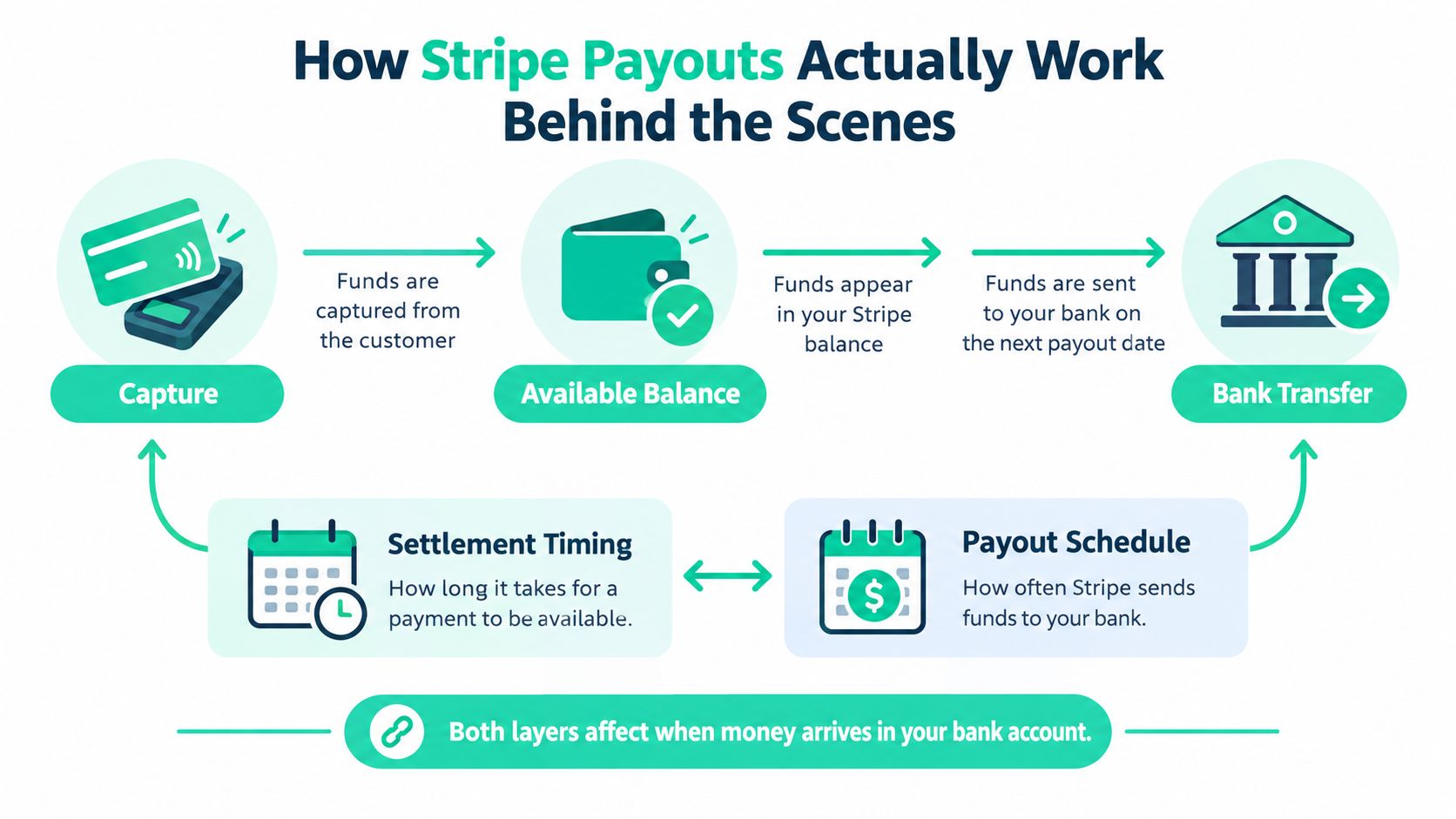
Think of a Stripe payment as moving through a short pipeline rather than jumping directly from a supporter's card to your bank account.
The first stage is capture. Stripe records the payment from the customer. The second stage is available balance. After the payment settles, the funds become eligible for payout. The third stage is bank transfer, where Stripe sends the available balance according to your payout settings.
The first clock is settlement timing
Settlement timing answers one question: how long does Stripe need before the payment becomes available? Stripe gives the example of a standard T+3 settlement timing, where funds are available for payout within 3 business days after capture. If a creator uses a daily automatic payout schedule, Stripe sends funds each day from payments captured three business days earlier.
That doesn't mean every payment rail follows the same path. Stripe lists longer settlement times for some methods, including ACH Direct Debit at 4 business days and SEPA Direct Debit at 6 business days. The payment method can therefore change the first clock before your payout schedule even matters.
The second clock is your payout schedule
Payout schedule answers a different question: how often does Stripe send funds that are already available? Stripe says schedules may be daily, weekly, monthly, or manual, with daily as the default where supported.
A daily schedule sends available funds frequently. A weekly schedule waits for the next weekly payout date. A monthly schedule creates a longer gap between availability and bank transfer. Manual payouts require you to initiate the transfer yourself.
This distinction is also important for teams building payment infrastructure. If you're evaluating a HB700 compliant payout API, compare how the system represents settlement status, payout initiation, transfer state, and final delivery. A useful payout integration shouldn't collapse those events into one vague “paid” label.
Add the bank's processing stage
Once Stripe sends a payout, the receiving bank may still need time to process and post it. The dashboard can show that Stripe has initiated or completed its part while the bank account remains unchanged.
A simple forecasting formula is:
Payment capture → settlement timing → next payout date → bank processing
The formula isn't a guarantee, but it gives you a much better estimate than counting from the customer's payment date alone. If your schedule is daily and the payment follows T+3 settlement, start with three business days after capture, then allow for the bank's delivery process. If your schedule is weekly or monthly, the next scheduled payout date becomes an additional variable.
Standard Schedules Instant Payouts and Payment Method Differences
Creators often compare standard and instant payouts as if they were two versions of the same service. They solve different problems.
A standard payout follows your account's settlement and payout schedule. It's the normal choice for routine cash flow because it doesn't require you to react to every payment. An instant payout, where supported and available to your account, is designed for speed and may involve eligibility rules or an additional fee. Stripe's available options depend on country, account, bank, and payment type, so check the settings shown in your own dashboard before planning around instant access.
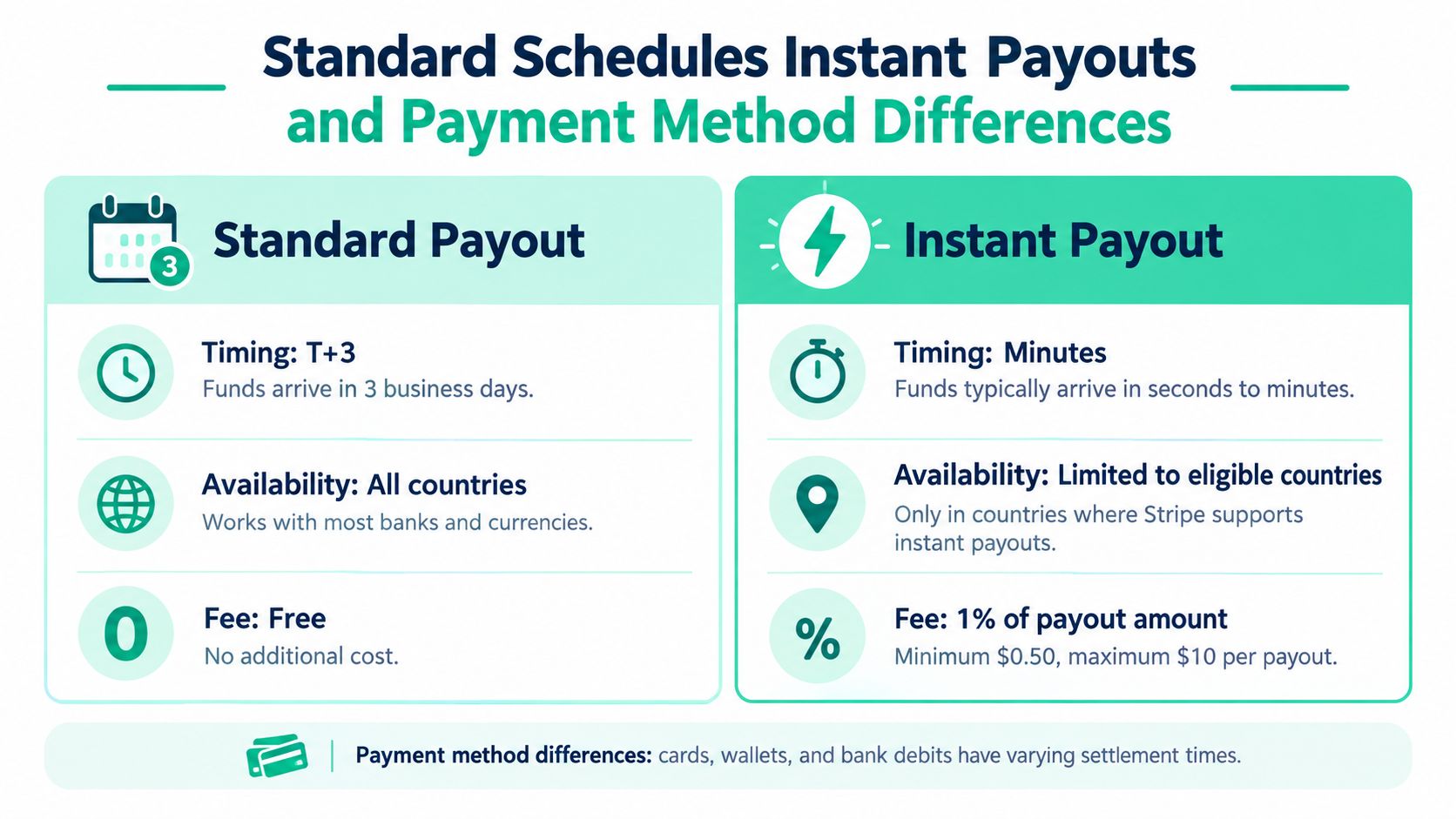
| Payout Type | Typical Timing | Key Note |
|---|---|---|
| Standard payout | Based on settlement timing and your daily, weekly, monthly, or manual schedule | Predictable for normal planning, but bank delivery still applies |
| Instant payout | Faster where supported and eligible | Availability, eligibility, and cost vary by account and location |
| ACH Direct Debit settlement | 4 business days | The payment method has a longer settlement window |
| SEPA Direct Debit settlement | 6 business days | Settlement can take longer before funds become available |
When standard is the sensible choice
Standard payouts usually fit planned expenses. If you're collecting support for development, software subscriptions, contractor invoices, or future reward fulfillment, the main requirement is a reliable forecast. A standard schedule gives you a consistent operating rhythm, even though individual payments may settle at different times.
It's also the better baseline for accounting. You can match captured payments, fees, refunds, and payouts without making every transfer an urgent decision. The amount that reaches the bank may be a net payout rather than a single contribution, so keep your Stripe transaction records aligned with the bank deposit.
When speed may justify a different option
Faster access can make sense when you have a time-sensitive business expense and the payout option is available to you. Before choosing it, verify the total cost, the eligible balance, and whether the payment method has already settled. An instant request can't make an unsettled bank debit available before its settlement process finishes.
The decision is simple:
- Choose standard timing when you're forecasting ordinary operating cash.
- Consider faster access when a confirmed, eligible balance needs to reach your bank quickly.
- Check the payment method before assuming all contributions settle like card payments.
- Use your dashboard as the authority because availability and settings are account-specific.
Why Payout Times Vary by Country Bank and Account History
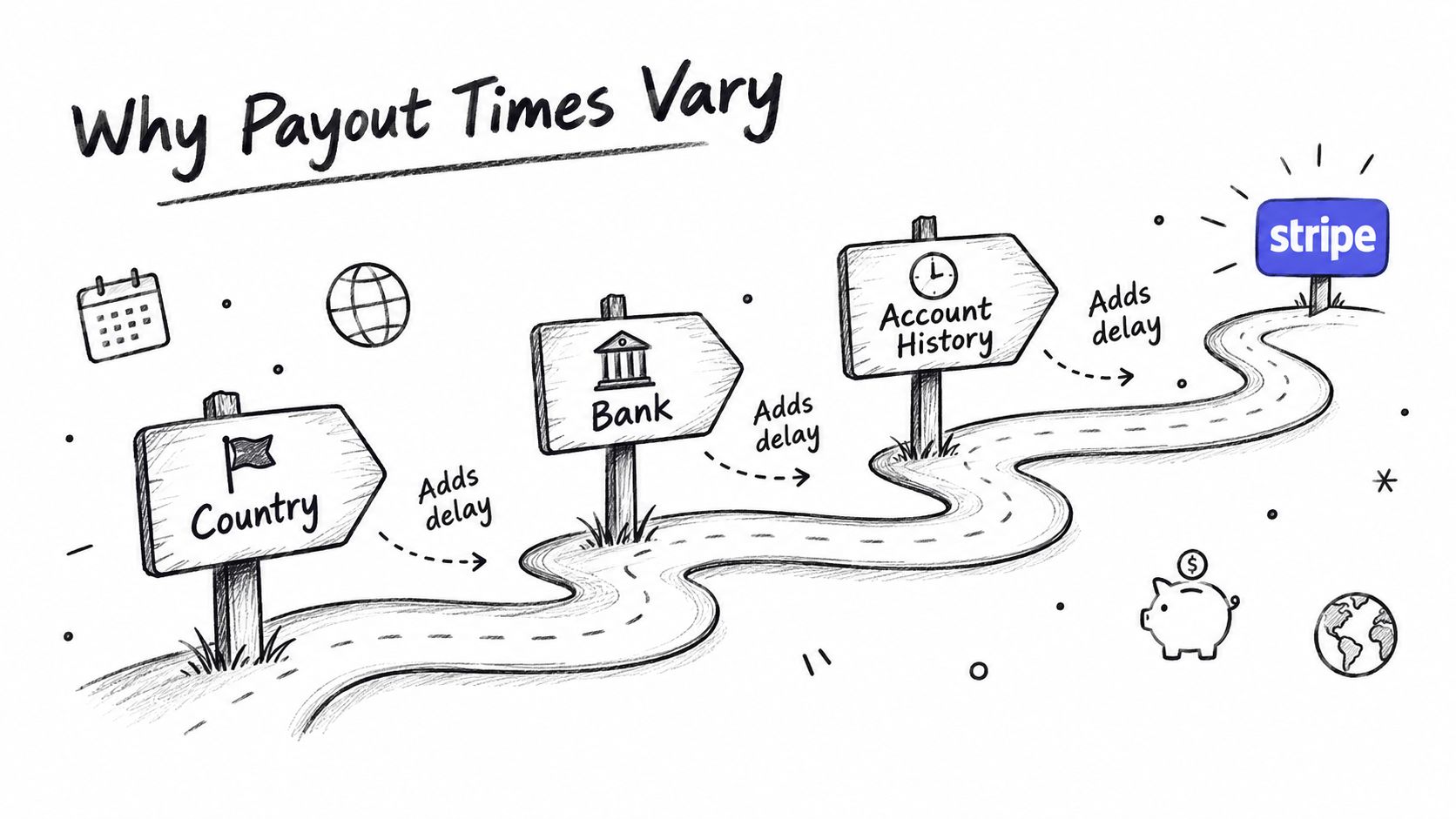
Stripe payout time changes when the surrounding conditions change. A creator in one country may have a different settlement experience from a creator using the same product in another country. The receiving bank can also post funds on a different internal schedule from Stripe's sending date.
The most important account-history variable is the first payout. Stripe says the first successful payment typically leads to a 7-day hold, but the hold can extend to 14 days for certain industries and up to 30 days in countries such as Brazil. That first wait isn't a useful benchmark for every later payout. Stripe uses it as part of its account and risk processes, so new creators shouldn't assume their first transfer represents their permanent schedule.
Location affects the baseline
Country and payment rail influence when funds become available. Stripe specifically identifies ACH Direct Debit and SEPA Direct Debit as methods with longer settlement windows than the standard T+3 example. Local banking infrastructure, currency handling, and regulatory requirements can also affect the route, although the exact result depends on your account.
The safest approach is to use the schedule Stripe displays for your account rather than borrowing a timeline from another creator. A founder who accepts card payments and a founder who accepts bank debits may be looking at different settlement clocks.
The bank can create the final delay
After Stripe sends a payout, the receiving bank may still need to post it. Stripe says a payout sent less than 5 business days ago may still be in bank processing, and weekends or holidays can add delay. Stripe also notes that banks may take 2 to 3 extra days to post funds, depending on their processing.
That's why a payout can look complete in Stripe while remaining absent from your available bank balance. The status tells you where the transfer is in the pipeline, not necessarily that every banking system has finished.
Set expectations from your own account history: the first payout, later payouts, payment method, country, and bank all matter.
How to Check Your Payout Status in the Stripe Dashboard
Start with the Stripe Dashboard, not your bank statement. Stripe can show whether a payout is pending, in transit, paid, or failed, along with the expected date and transaction details needed for reconciliation.
Find the payout record
Sign in to the Stripe account connected to your creator activity and open the Balances or Payouts area. The exact labels can vary with the Dashboard interface, but you're looking for the list of transfers sent to your bank.
Open the relevant payout and record:
- Payout status, such as pending, in transit, paid, or failed.
- Expected arrival date, if Stripe provides one.
- Payout amount, including the currency.
- Destination bank account, so you can confirm the transfer went to the intended account.
- Payout or trace details, which can help the bank locate the deposit.
If you're reconciling Fundl contributions, compare the Stripe payment records with the payout batch rather than expecting one bank deposit for each contribution. The bank may receive a combined payout containing multiple transactions and adjustments.
Read the status correctly
A pending payout generally means Stripe hasn't completed the sending process. Check whether the underlying payments are still settling, whether your schedule has a later payout date, or whether Stripe is requesting account information.
In transit usually means Stripe has sent the funds and the bank is processing delivery. Paid indicates that Stripe considers the payout completed on its side, but you may still need to allow the receiving bank time to post it. Failed calls for a review of the failure reason, bank details, or account requirements.
Take a screenshot that includes the status, amount, expected date, destination, and trace information. Avoid sharing sensitive banking credentials. These details give Stripe or your bank enough context to identify the transfer without a long explanation.
Common Reasons Your Stripe Payout Is Delayed and How to Fix It
The fastest diagnosis starts by asking one question: has Stripe sent the payout yet?
If the answer is no, inspect the Stripe Dashboard for an account requirement, verification request, failed payment, reserve, dispute adjustment, or incorrect bank information. A new account may also be within its first-payout hold. Resolve the specific issue shown in the account rather than changing payout settings repeatedly.
If Stripe shows that the payout was sent less than 5 business days ago, Stripe says it may still be in bank processing. Weekends and holidays can extend the wait, and the receiving bank may take 2 to 3 additional days to post the funds. In that situation, contacting Stripe first may not speed things up because the transfer has already left Stripe.
Use this triage path
- Check the expected date. Compare the dashboard date with the current business-day calendar, including weekends and bank holidays.
- Confirm the status. Pending points toward Stripe-side availability or scheduling. In transit or paid points toward bank delivery.
- Review account requirements. Look for identity verification, business information, or bank-account requests.
- Confirm the destination. Check the last displayed digits or account description against the bank account you expect to receive the money.
- Escalate with evidence. Give support or the bank the exact amount, expected date, and trace ID shown in Stripe.
Give the bank a trace ID, not just a screenshot saying “paid.” The trace ID, amount, and expected date help the bank search its payment records.
Incorrect business or physical-address information can also create verification friction, especially for founders operating across borders. If you're unsure what documentation a service may accept as a real address for non-U.S. residents, resolve that question before a payout issue becomes urgent.
For broader launch preparation, use this guide to starting a crowdfunding campaign alongside your payment checklist. A campaign plan should include not only the fundraising message, but also the bank account, verification, and cash-flow details behind it.
Planning Your Cash Flow With Predictable Payout Timing
The two-clock model gives you a practical cash-flow rule: don't treat a contribution as spendable bank cash until settlement, payout scheduling, and bank delivery are complete.
For a new creator, that means separating three balances in your planning:
- Captured contributions, which show that customers or supporters paid.
- Available Stripe funds, which can be included in a payout.
- Cleared bank funds, which you can safely use for expenses.
This distinction helps with launch budgets. If a contractor invoice depends on campaign contributions, plan from the expected bank arrival rather than the capture date. If you're preparing physical rewards, software access, or customer support capacity, keep enough operating room for ordinary business-day variation.
Creators should also write down their actual Stripe settings. Record the payout schedule, the main payment methods, the expected first-payout behavior, and the receiving bank. After each payout, compare the predicted date with the actual posting date. Your own history becomes more useful than a generic promise of “fast payouts.”
Fundl's direct-to-creator payment flow makes this visibility especially important. Contributions go to the creator's Stripe account rather than sitting in platform escrow, so you can inspect the relevant payment and payout records directly. The same discipline helps when you're building recurring revenue, because recurring inflows still need to move through settlement and bank delivery before they become available for operating decisions.
Keep a short payout checklist
Before launch, confirm your bank details and complete any Stripe verification requests. During the campaign, check whether payments are available or still settling. After Stripe sends a payout, save the expected date and trace details, then contact the bank if the transfer remains unresolved after the applicable processing window.
Stripe payout time becomes much easier to manage once you stop asking, “When does Stripe pay?” Ask instead, “Which clock is running, and what evidence shows me where the money is?”
Fundl lets creators connect their own Stripe account, publish a traction page, and receive contributions directly while keeping payment status visible in Stripe. Visit Fundl to turn verified traction into a shareable campaign and plan your launch with a clearer view of when support becomes available cash.